
Microsoft 365 Intranet Limitations: Understanding the Gaps in Enterprise Solutions


Microsoft 365 is a market-leading platform for personal productivity. But many organizations also use the suite for building their corporate intranet. This blog post highlights some of the most common Microsoft365 intranet limitations you should know before making further decisions.

Microsoft 365 is a powerful productivity suite used by organizations worldwide. But when enterprises try to use Microsoft 365—especially SharePoint and Viva Connections—as a full intranet platform, they often face serious challenges.
In this article, we explore the most common Microsoft 365 intranet limitations and SharePoint intranet challenges that prevent organizations from building a seamless, engaging digital workplace. You'll discover the key gaps in branding, governance, usability, search, personalization, and analytics—and learn what you can do to bridge them.
Want a full comparison of Microsoft 365 vs modern intranet requirements? Download the guide: Comparing Your Intranet Requirements with Microsoft 365, SharePoint, and Viva Connections.
→ Learn more by exploring our blog post, which presents 16 SharePoint intranet examples covering communication, user experience, engagement, governance, and additional best-practice features. »
Branding and Governance: Lack of Consistency Across the Intranet
SharePoint makes it difficult to enforce centralized branding and templates.
Enterprise intranets require strong visual consistency to support internal branding and culture. But SharePoint’s out-of-the-box tools for theme control and layout templating are limited. With no centralized governance for branding, organizations often end up with fragmented intranet sections—leading to user confusion and diluted brand identity.
→ Explore how Omnia delivers a user-friendly, consistently branded intranet experience »
Navigation and Search: No Unified, Scalable Experience
Microsoft 365 lacks a centralized navigation model and cross-platform search.
Most organizations need a structured intranet menu and reliable enterprise search. But with SharePoint, navigation is managed on a per-site basis, and search results vary across apps like Teams, OneDrive, and SharePoint. This inconsistency frustrates users and wastes time. Also, the search experience is hard to customize with categories and refiners tailored to your needs.
→ Get best practices in this blog: 12 Great Intranet Navigation Examples »
→ Or download our guide: A Best Practice for Intranet Search and Navigation »
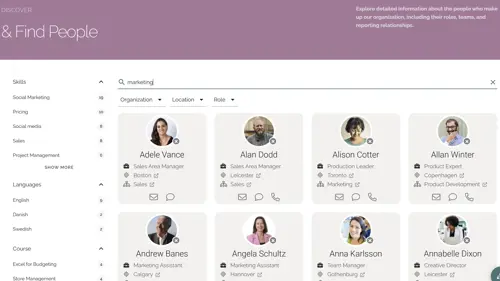
News and Content Targeting: Personalization Is Limited
SharePoint relies on Azure AD groups and lacks smart targeting or subscriptions.
Engaging intranets deliver relevant content to the right users. But SharePoint lacks audience filtering, topic subscriptions, and flexible targeting logic—limiting your ability to personalize news and updates. How many of your publishers have enough knowledge about AD Groups, possibly named and governed by IT, to ensure messages reach the right audience?
→ See how Omnia enables personalized, multichannel publishing »
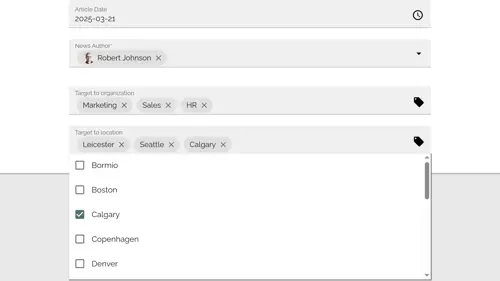
User Experience: Fragmented Across Microsoft 365 Apps
Inconsistencies in UX increase complexity for both users and editors.
Each Microsoft 365 app has its own design language and user model. This fragmented experience confuses users and requires extra training. SharePoint’s editing tools also lack intuitive workflows for intranet authors and content owners.
→ Learn how Omnia improves the content publishing experience »
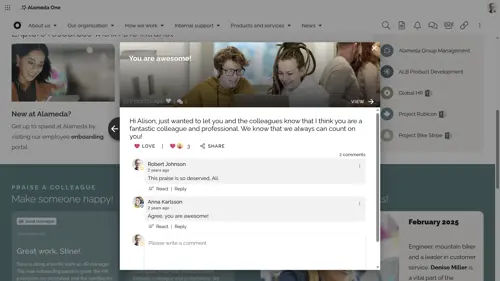
Personalization and Recognition: Missing Key Engagement Features
There’s no built-in support for recognition programs or advanced targeting.
Modern intranets help boost morale with employee recognition and role-specific content. SharePoint doesn’t support this out of the box—leaving HR and Communications teams to manage it manually or not at all.
→ Read how Omnia supports employee recognition and engagement »
Onboarding and Preboarding: No Automation or Portals
Microsoft 365 lacks built-in support for structured onboarding experiences.
Without automation, new hire onboarding becomes a manual, time-consuming process. SharePoint doesn’t provide preboarding checklists, welcome hubs, or role-based onboarding journeys.
→ Explore how Omnia improves onboarding with structured portals »
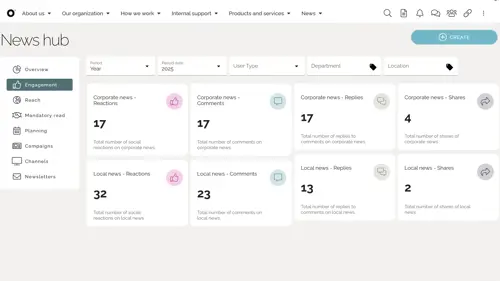
Analytics and Reporting: Short Data Retention, No Dashboards
SharePoint provides minimal data and no native reporting tools or dashboards.
With just 90 days of data retention and no unified analytics dashboard, Microsoft 365 limits your ability to monitor content performance, user engagement, and adoption trends—making it hard to improve your intranet.
→ See how Omnia offers customizable analytics dashboards »
Permissions and Governance: High Complexity and Risk
Site-level permission handling makes consistent governance difficult.
Microsoft 365 permissions are decentralized and often misunderstood. This leads to inconsistent access, orphaned content, and governance gaps that increase security and compliance risks.
→ Compare governance capabilities in our Microsoft 365 intranet guide »
Mobile and Frontline Access: Limited Optimization
SharePoint is not optimized to provide a mobile intranet for non-desk users.
SharePoint’s mobile experience is inconsistent across devices, and Viva Connections doesn’t reach all frontline employees effectively. Digital signage and device-free communication are also unsupported.
→ See how Omnia empowers mobile and frontline workforces »
Conclusion: Addressing Microsoft 365 Intranet Limitations with Omnia
Microsoft 365 offers a strong foundation—but not a complete intranet solution. If you’re facing the limitations of SharePoint and Microsoft 365 in areas like branding, personalization, governance, and analytics, it’s time to consider a purpose-built solution. Discover practical SharePoint intranet examples in the blog post: SharePoint Intranet Examples: 16 Top Ideas to Inspire Your Next Site.
Omnia fills the gaps with structured content governance, advanced personalization, intuitive UX, and powerful analytics—transforming Microsoft 365 into a true enterprise-grade intranet.